Independent fan guide. Details reflect the launch patch (v1.0.3) and cite official sources; if the game updates, in-game text always wins.
01The job, one cell at a time
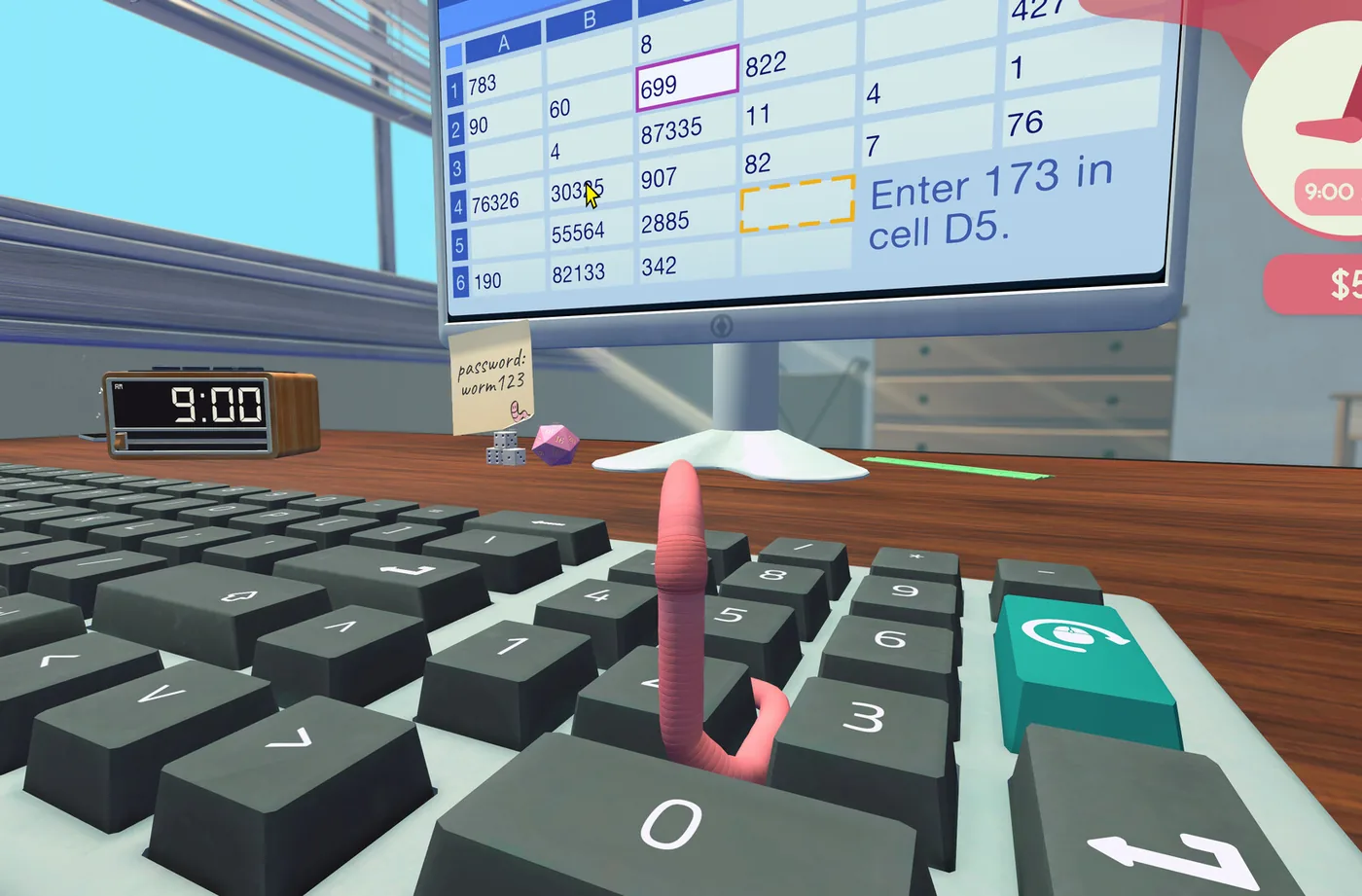
Six years into your career as a Junior Financial Analyst at Morton Corporation, the workload has finally revealed its shape: spreadsheets come in, you put the right input in the right cell, and money arrives task by task. That is the core loop of Worming from Home, and this guide walks it end to end, from the blue deadline on the wall calendar to the confirmation on the monitor. None of it is complicated. All of it is physical, because you are a worm and the keyboard is human-sized, so the difficulty is never the accounting. The difficulty is the trip across the keys.
The most useful thing to know before your first file is a design rule the game never spells out but honors everywhere: each spreadsheet needs one input. Not a filled grid, not an afternoon of data entry. One input. Sometimes you total a column, sometimes you type a value into a named cell, sometimes you choose the right entry from a list. Everything about your technique, from throw distance to error recovery, gets easier once you accept that the destination is always a single cell and the game is not asking for more.
One housekeeping note before the loop itself. Tippy, the voice-acted Clippy-style narrator, explains spreadsheet mechanics exactly once, in a lower-right hint that is genuinely easy to miss and does not repeat. If you are ever unsure why a file wants formatting or what the instruction bar is telling you, that explanation already happened while you were mid-fling. This guide exists so you do not have to find out the hard way.
02How tasks arrive: blue means deadline
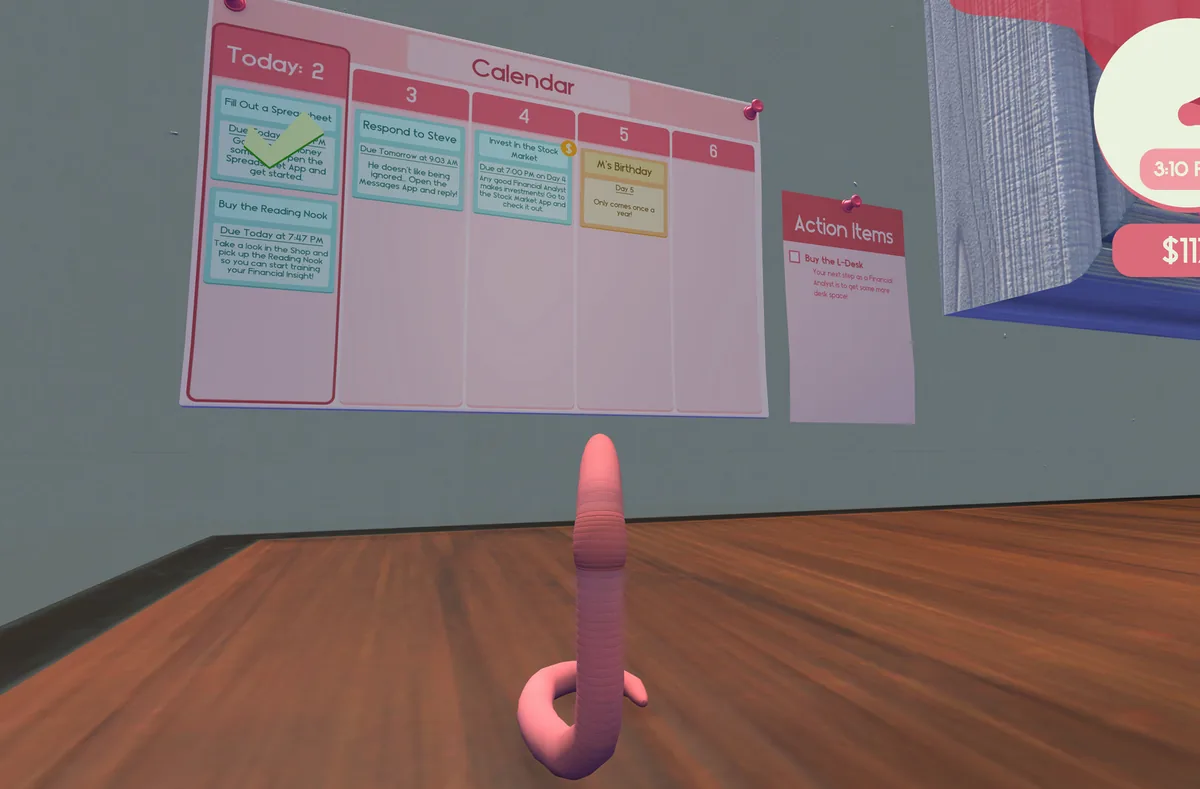
The wall calendar runs your workload. Blue entries are deadline tasks, and spreadsheet work arrives as blue entries with real due times attached, the kind you can actually miss. Orange entries are events: M's birthday, the quarterly earnings call, the market nudges like the opening-week instruction to invest by 7:00 PM on day four. The color code matters because the calendar is the only place a due time is announced. The task itself does not nag you. The game will happily let you discover at six in the evening that the file was due at 5:49.
Pay lands task by task. Each completed file pays on its own, and reviewers have described the per-task pay as surprisingly generous for the effort, which tracks with how quickly the early game funds your first purchases. You start with about 41 dollars in cash; the L-shaped desk that unlocks trading costs 1,000. Spreadsheets are how that gap closes. Rushing them, in the physics sense, is how the gap closes with bruises.
So the morning has an order, and launch-week playthroughs all settled on the same one: voicemail first, because Steve's stock tips are perishable; calendar second, because blue deadlines expire; then the d20 roll; then the work itself. The ten seconds spent at the wall is the cheapest productivity in the game. Skipping it is the most common way new players lose money they never knew they were owed, because a missed deadline pays nothing and complains about it even less.
03The one-input rule: three kinds of task
Every file reduces to one of three asks. A column total wants you to land the sum in a specific cell. An entry task names the exact cell and the exact value, and the instruction bar hands you both before you move a muscle you do not have. A list task wants you to pick the correct option from a list attached to the cell. That is the entire taxonomy, verified across playthroughs, and it holds from your first morning to the late-week files that want formatting on top.
The table below is the cheat sheet, and the notable thing about it is what is missing: volume. No spreadsheet in this game asks for a page of typing. The challenge is aim rather than endurance, and the worm who throws short and wiggles the last stretch will finish before the worm who flings for glory. Identify which of the three task types you are facing before you move, because that single label tells you where you are going and roughly how many keystrokes stand between you and the confirmation.
| Task type | What the instruction asks | Your one input | Common pitfall |
|---|---|---|---|
| Column total | Sum a column and land the result in a named cell | The total, entered in the target cell | Bashing the cell next door on the final approach |
| Enter a value | An exact value into an exact cell | A few deliberate keystrokes | Wiggling off before finishing the instruction |
| Choose from a list | Pick the correct entry from the cell list | One confirmed selection | Moving on without confirming the pick registered |
| Formatted file (later week) | Value work plus bold, italic, copy or paste | Keystrokes plus Ctrl shortcuts and a die | Leaving the die parked on Ctrl for the next word task |
04The input loop, step by step
Here is the loop, roughly as launch-week playthroughs run it. It looks like six steps and is really two habits wrapped around two actions: the habits are reading and confirming, the actions are aiming and bashing. Run it in order every time, even when the task looks trivial, because the steps players skip are always the ones that catch them, whether that is the unread instruction with a different cell than expected or the input that never actually registered while the worm was already celebrating two rows up.
- Read the instruction bar first: exact cell, exact value, before your worm moves.
- Line up the column letter and the row number, and pick your approach lane.
- Throw at half power toward the key, then wiggle the last stretch.
- Headbash the key once, watching the monitor rather than your worm.
- Confirm on screen that the input registered before you move on.
- Wrong cell or wrong value? Wiggle to Backspace, correct, then confirm again.
05Error recovery and the wiggle of shame
Mistakes are cheap, and the community has already named the recovery. The trip to Backspace is the wiggle of shame, and every player makes it, including the ones who end the week with the promotion. What separates a smooth morning from a miserable one is what you do on arrival: one press per wrong character, a glance at the screen, and back to the target key. Backspace lives in the top row, so treat it the way you treat everything up there, which is short throws and no heroics.
Approach angle fixes most missed keys. The reliable line, reported by players and consistent with the movement guide, is to come at a stubborn key from the row below and bump upward. Head-on approaches glance off the key's edge, and approaches from above tend to carry you straight past the key and into whatever sits behind it. If a key refuses to register, change the angle before you change the force; harder bashes on a bad line just relocate the miss.
The other classic is the re-fling. You miss a key by half an inch, and the instinct is to throw again from wherever you landed. Resist it. A second full fling overshoots the desk more often than it finds the key, and now the error is a fall and a respawn instead of a wiggle. Falling off the desk costs nothing permanent, but it costs time, and time is exactly what due times are made of. Wiggle to reposition; save the fling for real distance.
06Ctrl formatting and the die trick
Early files want values; later files want formatting. Bold, italic, copy and paste all sit behind Ctrl combinations, exactly like a real office and exactly as impossible for a worm, because you cannot hold Ctrl down and also be the finger pressing B. The community solution is beautifully stupid and completely official-adjacent: park a die on the Ctrl key. The desk ships with a d20 and three dice, and one of them is now office equipment rather than gambling equipment.
With the die parked, you bump B, I, C or V like any other key. Two caveats come straight from the threads that documented the trick. Arrow keys still work while Ctrl is held down, so navigation is unaffected. Typing does not, so the moment a file goes back to words, lift the die first. The number of players who concluded their game was broken while a die sat quietly on Ctrl is not small, and the fix is always the same three seconds of cleanup.
Learn the trick before the week demands it, because later files require formatting and the game does not send a reminder. One forward-looking note: a fully upgraded keyboard eventually removes the need for the die entirely. That sounds like a pure win and is not, for reasons the keyboard upgrades guide covers in unkind detail. The clacky starter and one parked die will carry you comfortably through the whole story.
07The $200 volume bonus and pay that scales
On top of the task-by-task pay sits a volume bonus: complete five spreadsheet files within 24 hours and the game pays a 200 dollar bonus. Five files sounds like a grind until you run the loop properly, at which point it is one focused morning plus an afternoon top-up. The bonus is the game rewarding exactly the habits this guide describes, so read the calendar, batch the work while the deadlines are far away, and keep your wiggles small enough that no file costs you a respawn.
The pay itself scales with your Financial Insight level. The reading nook runs a Snake-style minigame that earns perk points, and the Financial Insight tree includes an advanced spreadsheets perk that adds harder, better-paying files, plus scaling that raises what the regular files pay. Reading trains best after 9 p.m., so the week develops a natural shape: spreadsheets by day, books by night, and the day job quietly starts paying for the library habit and then some.
It is the cleanest trade in the game. Time in the nook makes every future file worth more, permanently, and the completion achievement for the full tree, Book Worm, sits at 34.6% of players, which tells you plenty of worms worked this out early. The advanced files assume you can format, so the die trick and the reading habit end up paying for each other. Reading makes your day job pay more, which is more than most libraries have ever done for anyone.
08The intern-firing spreadsheet
Buy an intern for 400 dollars and the desk gains a small passive income stream, observed by players at roughly two dollars a pulse and permanently buffable with coffee or water dousing, per the developer's own confirmation. The price rises about a hundred with each hire, and the shop caps the headcount at one hundred. Ten hires earns Valuable Work Experience, which 29.3% of players own. So far, so normal: a purchase, an income, an achievement, the standard furniture of a management game.
Then the game reveals the most corporate mechanic it has: interns can be fired via spreadsheet. Not thrown, not eaten, not dismissed in a tense hallway conversation. Filed. A form, a cell, an input, done, exactly like every other task on your desk, which is both the joke and genuinely the darkest corner of the game. The physical alternatives exist for the completionist: Establish Dominance, for throwing an intern away outright, at 12.9%, and Surveillance State, for filming one without permission, at 21.6%. Your HR record is, mechanically speaking, rich.
Practically, the spreadsheet route and the achievements are separate decisions, and neither is complicated. Firing by form is just another input task, the same loop as any blue deadline, run on a document that happens to have a person's name on it. Keeping every intern you hire, or running the desk like a quarterly restructuring, is a decision between you and the end-of-day progress report, which is as close as this game comes to a moral inventory.
09One good morning, start to finish
A realistic morning, no optimization, just the loop run honestly. Wake in the plant pot. Cross the desk, bash out the login, and let the monitor come up. Voicemail first: Steve left something overnight, and it is probably worth money on the market later. Calendar second: two blue entries, one due early afternoon, one due before the daily report. Roll the d20 while you are over there, because a natural 20 is its own payroll. Then the first file.
Instruction bar on file one: cell and value, read twice. Half-power throw, wiggle, bash, confirm on the monitor. The input registers, and the task pays. The second file is a column total, and the approach from the row below lands on the first try. The third file wants bold on a header, so the die goes onto Ctrl, the formatting happens, and the die comes back off before the fourth file's word task can be ruined. Messages from Trevor get answered between files, typed exactly as shown. The fifth file lands mid-afternoon, the 200 dollar bonus registers, and the rest of the day belongs to the nook, the gym, or the phone.
None of that required speed. It required reading, short throws, and confirmation, which is the entire skill ceiling of the spreadsheet side of the game. The evening closes with the progress report, earnings and net worth, and the number looks the way it looks because of ten seconds spent at the calendar that morning. Run the same morning twice more and the L-shaped desk stops being a dream and becomes a line item on the next report.
10Beginner mistakes to skip
Three mistakes account for most of the misery. First, starting to wiggle before finishing the instruction, which transposes a cell reference or swaps two digits and turns one input into three. Second, missing due times by not reading the calendar, which is the only silent failure in the loop: no alarm, no second chance, just a blue entry that was due at 5:49 and a task that paid nothing. Third, re-flinging instead of wiggling, which converts a half-inch error into a trip to the floor and a respawn.
The smaller ones are cheaper but no less common: leaving the die on Ctrl and blaming the keyboard for the typing that stops; bashing a key and wandering off without confirming on screen, then having to reconstruct what actually landed where; and treating the five-file bonus as a nice-to-have when it is the closest thing to a salary the job offers. Every fix in this list is a habit rather than a purchase, which is the good news and, for worms who prefer shopping, the bad news.