Independent fan guide. Details reflect the launch patch (v1.0.3) and cite official sources; if the game updates, in-game text always wins.
01When the market opens for you
Trading arrives on a schedule, and the schedule is written on the wall. Among the early blue deadline tasks is an entry reading invest in the stock market, due 7:00 PM on Day 4, which for most players lands roughly an hour into the game. The app itself is unlocked through the Financial Insight perk tree, leveled at the reading nook with a snake-style minigame, so the market and the evening reading habit arrive together. Your starting stake is about 41 dollars, which the game hands you with a straight face and exactly one stock to spend it on.
The expansion path is administered by phone. Sign the contract that follows the L-shaped desk purchase, at 1,000 dollars, and Steve calls to say you'll be able to trade three different stocks instead of just one. Tippy's celebration, three whole stocks, that's like the entire market, is the game telling you plainly that three is meant to feel enormous. A later call grants full access to the stock portfolio. No verified source itemizes what that adds, so when the call comes, read your own screen and take nothing else's word for the list.
The paperwork in the middle is tracked, by the way: signing, printing, scanning and returning the contract pops the hidden Kafkaesque achievement, currently at 36 percent of players, which is a decent estimate of how many worms make it to the real market. What the pacing means practically: do not grind the starter stock. One name, a 41 dollar stake and a chart you cannot yet read news onto is a tutorial, not an economy. Push the L-shaped desk purchase, survive the contract paperwork, and start actual trading when the market has enough names for a tip to be a choice rather than a sentence.
- Hit the Day 4 deadline: open the app and make one small trade on the starter stock.
- Save 1,000 dollars for the L-shaped desk, then sign, print, scan and return the contract.
- Take Steve's call and relearn the app with three tradeable stocks.
- Build the stake on tips until the full-access call expands the portfolio again.
02The screen, piece by piece
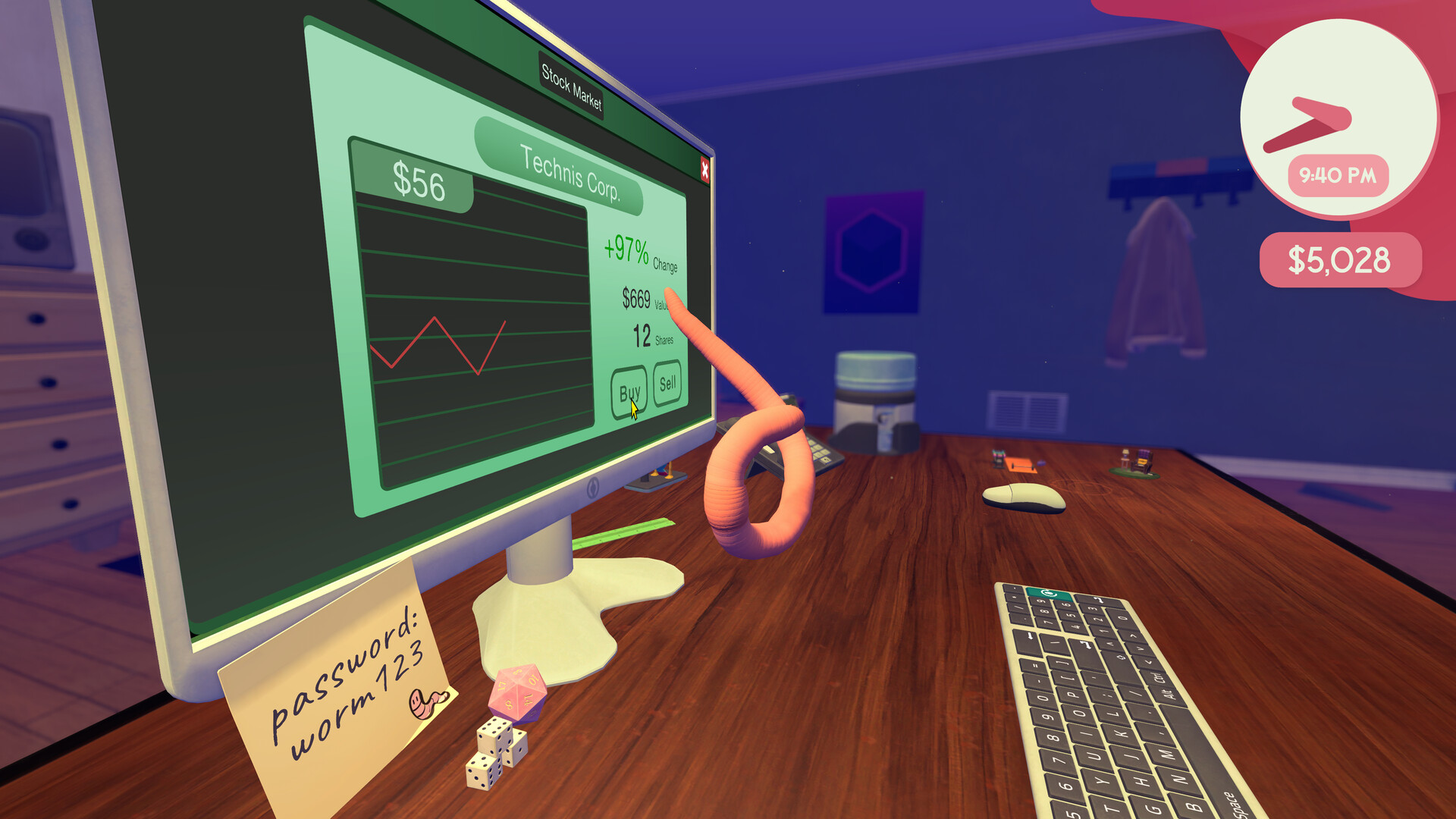
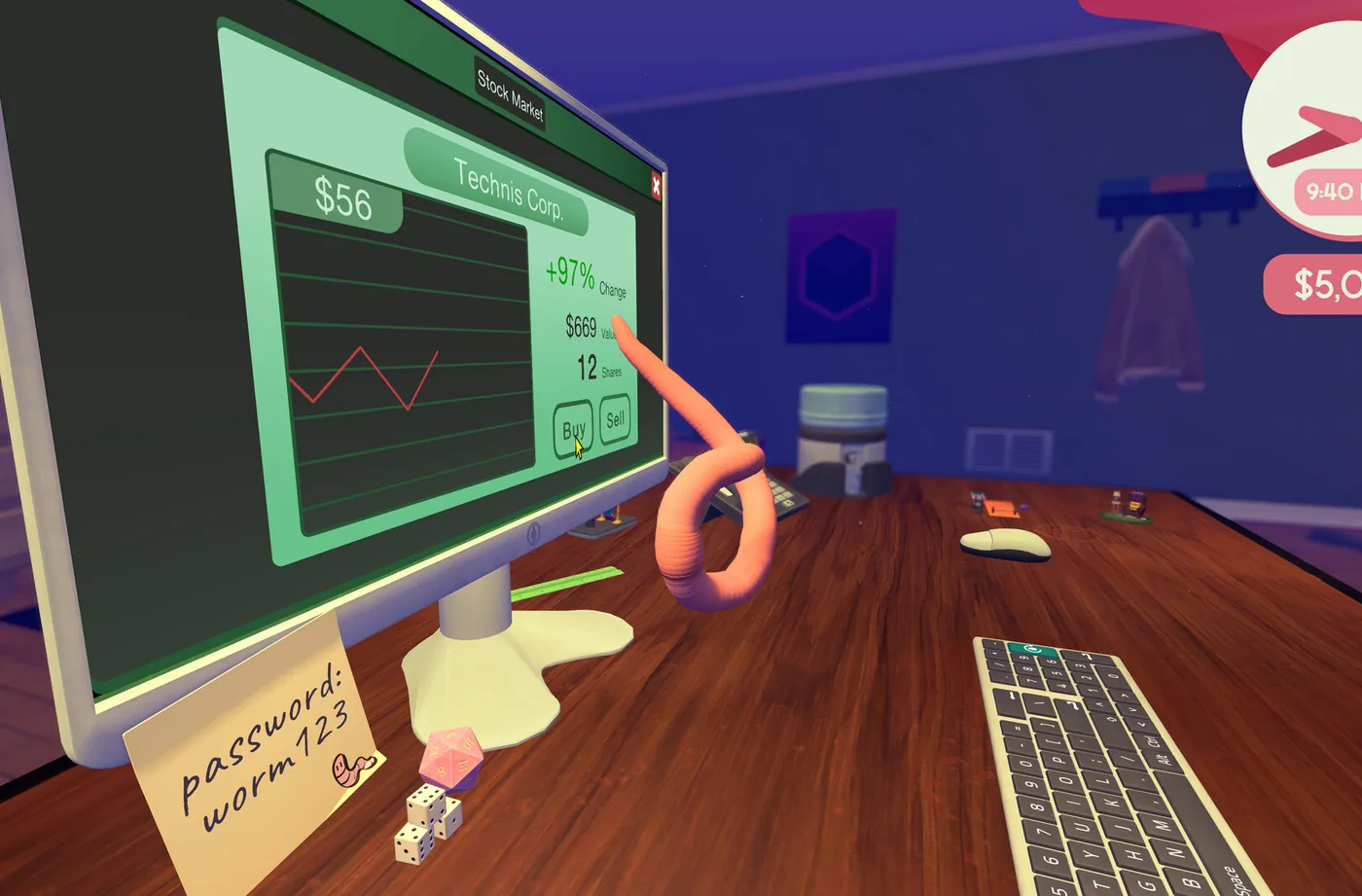
Every number in this section comes from one place: the official press kit screenshot of the Stock Market app, the only official look at the trading screen anyone has. It shows a window titled Stock Market, a selected company named Technis Corp., a price of 56 dollars, a change of plus 97 percent, a position of 12 shares, and a value of 669 dollars, with Buy and Sell buttons under a line chart and the cash HUD pinned on screen. That is the entire interface. Here is what each piece is for.
Price is what one share costs right now. Change is the move the app tracks, displayed as a percentage; the screenshot's plus 97 is the stock's move, not your profit, and the reference point it is measured from is not documented anywhere verified. Shares is how many you hold in the selected company, 12 in the screenshot. Value is what that position is currently worth, and here the official numbers contain a small mystery: 12 shares at 56 dollars is 672, and the app shows 669. Three dollars are unaccounted for. Fees, rounding and a slightly different mark are all candidates, none confirmed.
Buy and Sell are the whole order interface. There is no order type, no duration, no limit price and no short selling anywhere in the verified screen. The line chart shows the selected stock's history, and the cash HUD shows your bank balance, which is the same balance the shop draws on, a detail that has ruined more than one desk upgrade. Buying is a physical act like everything else here, and the Financial Insight tree's Shift perk is what turns a single keybash into a bulk order, which starts mattering the day your positions get serious. If the screen looks sparse, that is accurate: it is a junior analyst's terminal, not a brokerage.
03What every element means (and what players misread)
Compiled into a reference table, with the misreading each field invites. The interface is simple enough that nobody struggles to find the buttons; the mistakes are all interpretation, and two of them, the meaning of change and the arithmetic of value, account for most of the confused launch-week posts. Numbers in the first column are the screenshot's Technis Corp. values, so you can map the table directly onto your own screen.
| UI element | What it shows | What players get wrong |
|---|---|---|
| Price ($56) | The cost of one share of the selected stock | Reading it as the total outlay; your order size decides what you spend |
| Change (+97%) | The stock's percentage move, as tracked by the app | Assuming it is your profit; it is the stock's move, and its reference point is undocumented |
| Shares (12) | How many shares you hold in this company | Confusing current holdings with the amount you are about to buy |
| Value ($669) | What your current position is worth | Expecting shares times price to match exactly; the official screenshot is three dollars off |
| Buy | Sell | The entire order interface | Hunting for short selling or limit orders; nothing in the verified UI offers either |
| Line chart | Price history for the selected stock | Trusting fan screenshots with time-range tabs; no chart tabs are verified |
| Cash HUD | Your bank balance, live | Forgetting the shop spends the same money, and vice versa |
04The companies: verified, heard and invented
One company name is confirmed from official material: Technis Corp., pictured at 56 dollars a share in the press kit screenshot. Everything else on the tape is fuzzier, and honesty about the fuzz is cheaper than repeating it as fact. The recall company, the one pulling 100,000 handsets, is heard as Tennis in the launch playthrough, a spelling players on stream could not confirm. The defense-contract stock, the game's flagship bullish tip, has a name that is garbled in every caption we checked. Biolatica surfaces in the in-game news with the report that they have a cure.
What no verified source contains: tickers, for any company; a sector or business description beyond what the news says; and the full stock list after the full-access call unlocks whatever it unlocks. The wiki farms have filled that vacuum with invented tickers, and a couple of the fabricated names are already circulating, so apply the usual test. If a guide prints a ticker for this game, the guide made the ticker up. The only name you can trust is the one on your own screen, and the only one anyone can prove is Technis Corp.
05News events, and the perk that pins them to the chart
Underneath the wiggling line, the market in this game is driven by events: contract wins, recalls, layoffs, earnings reports, cures. The Financial Insight tree includes a perk that reveals news events directly on the charts, marking them where they happened, and players who have it describe the market changing character entirely. A chart that looked random becomes a timeline you can read, and the long-term moves stop feeling like weather and start feeling like consequences.
Until that perk, you assemble the same timeline by hand: voicemail, calendar, chart. The calendar half is worth emphasizing even for readers who never touch the tips guide, because dated events are visible before they land, which makes the chart's future partially public. The perk does not create the edge. It just stops making you do the filing yourself. For the full workflow of trading the information before the market prices it, the insider trading starter guide owns that subject end to end.
06Coffee, interest and the overnight hold
Two Financial Insight perks change the market's metabolism. One makes coffee speed the market up: with the perk, the machine (community-reported around 8,000 dollars, very much a late-game buy) makes prices tick faster, which compresses a slow trading day into something you can actually sit through. Coffee has a second documented use elsewhere on the desk, by the way; dousing interns in it buffs them permanently, a mechanic the developer confirmed, so the machine works double shifts once you can afford it.
The other is a flat 5 percent interest perk, and alongside it the tree rewards patience: hold positions through the night and let the news finish landing while you sleep in the pot. One launch stream closed days at plus 17 and plus 21 percent net worth doing exactly that, with positions held overnight rather than day-traded flat. Those numbers belong to one playthrough and one tip cycle, so treat them as evidence the strategy works, not as an expected return. Your nights will vary with what you are holding and why. For the completionists: every perk in this tree, market ones included, caps out at the Book Worm achievement, which 34.6 percent of players own, so the full trading kit is an ordinary run, not a grind.
07Watching the market while you work
The Wand Report's review makes a point that sounds small and shapes the whole loop: you can watch the market without interacting with it. The app sits open, the chart updates, and your worm is free to bang out spreadsheets, answer messages and roll dice in front of it. Trading in this game is not a mode you enter. It is a window you leave open, which suits both the fiction, a junior analyst glancing at a ticker between tasks, and the reality of a desk you cannot leave.
The practical shape of a trading day follows from that. Morning: voicemail, calendar, then open the app and act on anything dated today. Working hours: leave the chart visible, glance between files, and resist touching it without a reason. Evening: the progress report that closes every day summarizes earnings and net worth, which is the game keeping score of your holding for you. The stake you are watching gets built at the same keyboard: spreadsheets pay per task, and five files inside 24 hours stack a 200 dollar bonus, the single best funding mechanism for a market position in the early week. Watching, in this economy, is a complete strategy; the intervene-constantly alternative is how the self-inflicted losses happen.
08Losses are real, and mostly self-inflicted
The risk disclosure, such as it is: you can lose money on this market, and no debt mechanic has been observed by any reviewer, streamer or thread we could verify. Downs are real, recoveries are real, and the floor, as far as anything documents, is your cash going awkwardly quiet rather than negative. That makes the market's danger almost entirely directional. You lose by buying the wrong tip, holding through the wrong event, or buying so hard you move the price against yourself, which players have demonstrably done.
On that last point: your own orders move prices in this game, and one player documented pushing a stock past 100 dollars a share by buying alone. Size your orders like someone who is a meaningful fraction of the market, because functionally you are. When a position goes wrong anyway, the launch playthrough's philosophy has become community shorthand: a chart doing atrocious is a buying opportunity, and the AzureBay streamer bought more exactly there. The dip-buying guide covers that discipline in full; the short version is that losses are tuition, and the market is the only entity in this game that ever sends you a bill.
09What is not verified
An honest closing inventory, because this game's wiki coverage is already unreliable. Chart time-range tabs: not verified. Fan sites publish screenshots with 1D, 1W and 1M buttons; no official screenshot, playthrough or developer statement shows them, and the fabricated version should stay quarantined wherever it appeared. Chart update cadence, how often the line actually ticks: also not verified, by anyone. If a guide quotes either detail as fact, the guide invented it, and the rest of the guide deserves the suspicion that creates.
The same disclaimer covers tickers for any listed company, the stock list after full access, whether the change percentage resets daily, and any post-promotion market behavior. None of it is documented in verified sources. The reliable observation tools are the ones in your own save: the game keeps plain JSON saves across three slots, so if you genuinely want to know how the market behaves overnight, a backup and an evening of watching will beat every wiki on the internet.
Verified and safe to plan around: the unlock pacing, the Technis Corp. numbers from the official screenshot, news-driven moves, the news-chart perk, coffee's effect on market speed, the 5 percent interest perk, and real losses with no observed debt. For what to do with all of that, the insider trading starter guide has the workflow, the dip-buying guide has the bad days, and the day trader guide has the 100-share sprint. The screen, it turns out, was the easy part.